
BÀI 8 – TÌM KIẾM VÀ THAY THẾ
tinhoccanbannhat.blogspot.com



1. Xóa và chèn thêm văn bản.
BACKSPACE: Xóa kí tự ngay TRƯỚC con trỏ soạn thảo.
DELETE: Xóa kí tự ngay SAU con trỏ soạn thảo.
Chèn thêm văn bản.
Lưu ý quan trọng: Suy nghĩ cẩn thận trước khi xóa nội dung văn bản.
2. Chọn phần văn bản:
3. Sao chép:
4. Di chuyển:
Để xóa một vài kí tự, BACKSPACE hoặc DELETE.
Nguyên tắc: Khi muốn thực hiện một thao tác nào đó tác động đến một phần văn bản hay đối tượng nào đó, trước hết cần phải CHỌN phần văn bản đó hay đối tượng đó.
Sao chép phần văn bản là giữ nguyên phần văn bản đó ở vị trí gốc, đồng thời them nội dung đó vào vị trí khác.
Di chuyển phần văn bản tức là: di chuyển một phần văn bản từ trí này sang một vị trí khác, nhưng phần văn bản gốc sẽ bị mất di.

Bài 3
|
DẤU
|
KÝ HIỆU
|
BÀN PHÍM
|
|
Huyền
|
`
|
F
|
|
Sắc
|
/
|
S
|
|
Hỏi
|
’
|
R
|
|
Ngã
|
~
|
X
|
|
Nặng
|
.
|
J
|
|
Xoá dấu
|
Z
|
|
|
Â
|
Â
|
AA
|
|
Ă
|
Ă
|
AW
|
|
Ê
|
Ê
|
EE
|
|
Ô
|
Ô
|
OO
|
|
Ư
|
Ư
|
W, ] , UW
|
|
Ơ
|
Ơ
|
[ , OW
|
|
Đ
|
Đ
|
DD
|

| Cách gõ Tiếng Việt với bộ gõ VNI |

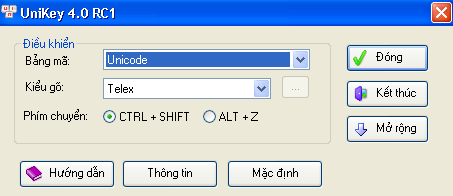
– Chọn kiểu gõ: Telex và bảng mã: Unicode dựng sẵn.

Bài 2: MÀN HÌNH VÀ CÁC PHÍM CHỨC NĂNG
|
ĐỂ DI CHUYỂN
|
BẤM PHÍM
|
|
|
Sang trái một ký tự
|
®
|
|
|
Sang phải một ký tự
|
¬
|
|
|
Lên một dòng
|
|
|
|
Xuống một dòng
|
¯
|
|
|
Cuối một dòng
|
End
|
|
|
Đầu một dòng
|
Home
|
|
|
Lên một trang màn hình
|
PgUP (Page Up)
|
|
|
Xuống một trang màn hình
|
PgDn (Page Down)
|
|
|
Xuống cuối của tư liệu
|
Ctrl + End
|
|
|
Lên đầu của tư liệu
|
Ctr+Home
|

// Set the date we’re counting down to var countDownDate = new Date(“Feb 5, 2019 00:00:00″).getTime(); // Update the count down every 1 second var x = setInterval(function() { // Get todays date and time var now = new Date().getTime(); // Find the distance between now an the count down date var distance = countDownDate – now; // Time calculations for days, hours, minutes and seconds var days = Math.floor(distance / (1000 * 60 * 60 * 24)); var hours = Math.floor((distance % (1000 * 60 * 60 * 24)) / (1000 * 60 * 60)); var minutes = Math.floor((distance % (1000 * 60 * 60)) / (1000 * 60)); var seconds = Math.floor((distance % (1000 * 60)) / 1000); // Display the result in the element with id=”demo” document.getElementById(“demo”).innerHTML = days + ” ngày: ” + hours + ” giờ: ” + minutes + ” phút: ” + seconds + ” giây “; // If the count down is finished, write some text if (distance < 0) { clearInterval(x); document.getElementById("demo").innerHTML = "Chúc mừng năm mới!"; } }, 1000);

Khi rê chuột vào vùng hiệu ứng có hiệu lực, chỏ chuột có hình dấu cộng và pháo hoa sẽ xuất hiện nếu nhấp chuột.
canvas{ cursor:crosshair; position:fixed; width:100%; height:100%; background:none; display:block
//<![CDATA[ window.requestAnimFrame = ( function() { return window.requestAnimationFrame || window.webkitRequestAnimationFrame || window.mozRequestAnimationFrame || function( callback ) { window.setTimeout( callback, 1000 / 60 ); }; })(); var canvas = document.getElementById( 'canvas' ), ctx = canvas.getContext( '2d' ), cw = window.innerWidth, ch = window.innerHeight, fireworks = [], particles = [], hue = 120, limiterTotal = 5, limiterTick = 0, timerTotal = 30, timerTick = 0, mousedown = false, mx, my; canvas.width = cw; canvas.height = ch; function random( min, max ) { return Math.random() * ( max – min ) + min; } function calculateDistance( p1x, p1y, p2x, p2y ) { var xDistance = p1x – p2x, yDistance = p1y – p2y; return Math.sqrt( Math.pow( xDistance, 2 ) + Math.pow( yDistance, 2 ) ); } function Firework( sx, sy, tx, ty ) { this.x = sx; this.y = sy; this.sx = sx; this.sy = sy; this.tx = tx; this.ty = ty; this.distanceToTarget = calculateDistance( sx, sy, tx, ty ); this.distanceTraveled = 0; this.coordinates = []; this.coordinateCount = 3; while( this.coordinateCount– ) { this.coordinates.push( [ this.x, this.y ] ); } this.angle = Math.atan2( ty – sy, tx – sx ); this.speed = 2; this.acceleration = 1.05; this.brightness = random( 50, 70 ); this.targetRadius = 1; } Firework.prototype.update = function( index ) { this.coordinates.pop(); this.coordinates.unshift( [ this.x, this.y ] ); if( this.targetRadius = this.distanceToTarget ) { createParticles( this.tx, this.ty ); fireworks.splice( index, 1 ); } else { this.x += vx; this.y += vy; } } Firework.prototype.draw = function() { ctx.beginPath(); ctx.moveTo( this.coordinates[ this.coordinates.length – 1][ 0 ], this.coordinates[ this.coordinates.length – 1][ 1 ] ); ctx.lineTo( this.x, this.y ); ctx.strokeStyle = ‘hsl(‘ + hue + ‘, 100%, ‘ + this.brightness + ‘%)’; ctx.stroke(); ctx.beginPath(); ctx.arc( this.tx, this.ty, this.targetRadius, 0, Math.PI * 2 ); ctx.stroke(); } function Particle( x, y ) { this.x = x; this.y = y; this.coordinates = []; this.coordinateCount = 5; while( this.coordinateCount– ) { this.coordinates.push( [ this.x, this.y ] ); } this.angle = random( 0, Math.PI * 2 ); this.speed = random( 1, 10 ); this.friction = 0.95; this.gravity = 1; this.hue = random( hue – 50, hue + 50 ); this.brightness = random( 50, 80 ); this.alpha = 1; this.decay = random( 0.015, 0.03 ); } Particle.prototype.update = function( index ) { this.coordinates.pop(); this.coordinates.unshift( [ this.x, this.y ] ); this.speed *= this.friction; this.x += Math.cos( this.angle ) * this.speed; this.y += Math.sin( this.angle ) * this.speed + this.gravity; this.alpha -= this.decay; if( this.alpha = timerTotal ) { if( !mousedown ) { fireworks.push( new Firework( cw / 2, ch, random( 0, cw ), random( 0, ch / 2 ) ) ); timerTick = 0; } } else { timerTick++; } if( limiterTick >= limiterTotal ) { if( mousedown ) { fireworks.push( new Firework( cw / 2, ch, mx, my ) ); limiterTick = 0; } } else { limiterTick++; } } canvas.addEventListener( ‘mousemove’, function( e ) { mx = e.pageX – canvas.offsetLeft; my = e.pageY – canvas.offsetTop; }); canvas.addEventListener( ‘mousedown’, function( e ) { e.preventDefault(); mousedown = true; }); canvas.addEventListener( ‘mouseup’, function( e ) { e.preventDefault(); mousedown = false; }); window.onload = loop; //]]>
 MaSi Blog